


Payments
There are many ways to make a payment; Choose one: eTransfers, eDeposits, QuickPay, Zelle, and More

Paze
What is Paze®?
Paze is a digital wallet offered by iTHINK and other participating banks and credit unions that makes online checkout quick and easy. When you see Paze at a participating merchant, you can use your eligible iTHINK credit or debit card without entering your card number each time you shop.
Why Paze?
- Added security. Check out with confidence. Paze doesn’t share your actual card number with merchants.
- Convenience. Once you activate Paze, your eligible iTHINK cards are available—no separate app to download or new account to create. Your card details also update automatically if a card is reissued or its expiration date changes.
- Speed. Enjoy fast
Activate your Paze wallet
Activate Paze, then look for the Paze logo at participating online merchants for a fast and easy way to check out.
Paze and the Paze related trademarks are wholly owned by Early Warning Services, LLC and are used herein under license
Online checkout
Paze® Frequently Asked Questions
Get quick answers about using Paze with your eligible iTHINK Financial cards.
What is Paze®?
Paze is an online checkout solution offered by iTHINK and other participating banks and credit unions. Paze gives you access to your eligible credit and/or debit card(s) in one place, making it easy to check out online without manually entering your card information or sharing your actual card number with merchants.
How can I activate and use Paze?
You can activate Paze in the iTHINK mobile app, through online banking, or at mywallet.paze.com . To use Paze when shopping online, look for the Paze logo at checkout. Follow the prompts to access your wallet, select an eligible card, and complete your purchase.
Where can I use Paze?
You can check out with Paze at any participating online merchant. Click here to view the list of merchants that offer Paze at checkout.
Does Paze offer added security?
Yes, Paze offers added security by helping protect your actual card numbers from being shared with merchants.
What email address or phone number should I use with Paze?
Use the same email address and mobile number associated with your iTHINK account when prompted at checkout.
If you need to update your email or phone number, you can do this in the iTHINK mobile app or through online banking.
Why don’t I see one of my cards in my Paze wallet?
Only eligible U.S. credit and debit cards from participating banks and credit unions can be used with Paze. If a card does not appear in your Paze wallet, the card may not yet be eligible for Paze.
To view your eligible cards, visit the iTHINK mobile app or mywallet.paze.com .
If you do not see a card that you believe should be eligible, please contact iTHINK for assistance.
How do I manage the cards in my Paze wallet?
Manage the cards in your Paze wallet from the iTHINK mobile app or through online banking, or at mywallet.paze.com .
I’m having an issue checking out with Paze. Who should I contact?
Please contact iTHINK using the number on the back of your card if you:
- Are locked out of your Paze wallet
- Need help with a transaction or dispute
- Have another Paze question or issue
If you see an unrecognized or unauthorized transaction, contact iTHINK immediately.
How do I opt out of Paze?
You may opt out of Paze at paze.com/optout after iTHINK has added your eligible card(s) to the service. If you need assistance, please contact iTHINK using the number on the back of your card.
Have another question about Paze? Visit Paze.com/faqs for additional FAQs and information.
Zelle
Zelle® is a great way to send money to friends and family, even if they bank somewhere different than you do.* That means it’s super easy to pitch in or get paid back for all sorts of things, like coffee for your coworkers or dinner with friends.
BillPay
Just point, click, and your bills will be paid on time, every time.
- Eliminate checks, envelopes, and stamps
- Great for recurring bills such as HOA dues, rent, tuition, lawn service, and other merchants that are unable to debit your accounts directly.
- Pay bills 24 hours a day/7, days a week
- Completely automated
- Today’s latest encryption technology ensures the safety and security of your accounts
- Different payment options are available such as: automatic, one-time, or manual
- Automatically transfers money from your Credit Union checking account per your request
QuickPay
Once inside Quick Pay, you can make loan payments using either a credit card or any internal iTHINK Financial account or external financial institution account.
Just select the loan you want to pay and choose your preferred payment method:
- Internal Transfer - Transfer a payment from your internal credit union account to your loan account. Your accounts will display with available balances, and your payment/transfer will be posted immediately if made before 10:45 p.m. ET (otherwise, it will post the next day). You can schedule recurring payments.
- External Transfer - For Digital Banking users that have enrolled in our eTransfers service, transfer a payment from your non-iTHINK Financial account. Your payment will be posted the next business day if submitted before 3:00 p.m. ET. You can schedule recurring payments.
- eCheck - Transfer a payment from your non-iTHINK Financial account to your loan account. Your payment will be posted the same day if submitted before 4:00 p.m. ET on a business day. You can schedule recurring payments.
- Credit/Debit Card* - Payment will be posted immediately if made before 10:45 p.m. ET. If the cardholder’s payment is made after 10:45 p.m. ET, it will post on the next business day. American Express cards are not accepted. You can schedule recurring payments. Card payments will include a fee of 3% of the payment amount.
You can make a single, one-time payment or schedule recurring monthly payments until your loan is paid off or the payment is canceled.
Mobile Payments
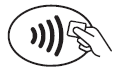
Now you can use your iTHINK Financial Personal or Business Visa® credit, debit, and HSA cards with Apple Pay, Samsung Wallet, Google Pay, or Garmin Pay almost anywhere you can swipe or tap your card.
Look for this icon at checkout:
eAlerts
eAlerts allow you to set up account alerts for:
- ACH Credits
- Account balance changes
- Loan balance changes
- Loan payment due dates
- Certificate maturity
- Cleared checks
- ACH Debits
- Debit/Credit card transactions
- Daily Account Balance
Learn More
eDeposits
eDeposit is a quick and easy way to make check deposits from anywhere. Scan checks for deposit and eDeposit will detect duplicate items, total the deposit for you, and provide a variety of deposit reports.
eTransfers
External Transfers is a service within Digital Banking that allows you to set up electronic fund transfers between your Credit Union account and your checking or savings accounts at other financial institutions.